
You sit down to send an email or pay a bill online and find yourself leaning closer to the keyboard. Maybe you’re squinting to find certain keys, turning on extra light, or making more typing mistakes because the letters are harder to see than they used to be.
If this sounds familiar, you’re not alone. Many adults notice that standard keyboard lettering becomes more difficult to read as vision changes with age, even when wearing glasses.
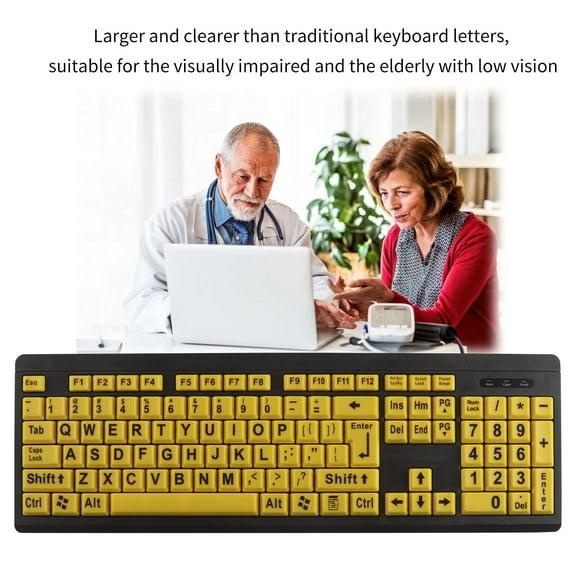
That’s where large print keyboards can help. Designed with larger lettering, higher contrast colors, and easier-to-read layouts, these keyboards can make everyday computer tasks more comfortable and less frustrating.
In this guide, we’ll look at the features that matter most and how to choose the best large print keyboard for seniors with vision difficulties.
Why Typing Can Become More Difficult With Age
Vision changes are a normal part of aging.
Common challenges may include:
- Difficulty reading small text
- Reduced contrast sensitivity
- Eye strain during computer use
- Trouble locating keys quickly
- Increased sensitivity to poor lighting
Even individuals who wear glasses may occasionally struggle to see standard keyboard lettering clearly.
As a result, simple computer tasks can become slower and more frustrating than they need to be.
Why Large Print Keyboards for Seniors With Vision Difficulties Are Helpful
Large print keyboards are designed to make keys easier to identify at a glance.
Potential benefits include:
- Larger lettering
- Improved contrast
- Easier typing
- Fewer mistakes
- Reduced eye strain
For many seniors, these improvements can make using a computer feel more comfortable and less tiring.
Who May Benefit Most From a Large Print Keyboard?
Large print keyboards may be especially helpful for:
- Seniors with age-related vision changes
- Individuals with low vision
- Computer users who frequently mistype
- Older adults who spend long periods online
- People who struggle with standard keyboard lettering
The easier it is to locate keys, the more enjoyable computer use often becomes.
High-Contrast Large Print Keyboards
One of the most popular options uses high-contrast color schemes.
Examples include:
- White letters on black keys
- Black letters on yellow keys
- Bright lettering against dark backgrounds
Benefits may include:
- Improved visibility
- Faster key recognition
- Better readability in various lighting conditions
⇒ See your choice of high-contrast large print keyboards here at Amazon
Backlit Large Print Keyboards
Some keyboards include illuminated keys.
Potential advantages include:
- Easier typing in low-light environments
- Improved visibility at night
- Enhanced contrast
These models may be particularly useful for individuals who frequently use computers during evening hours.
⇒ See your choice of backlit large print keyboards here
Large Key Keyboards
Some products combine larger lettering with larger physical keys.
Benefits may include:
- Easier key targeting
- Reduced typing errors
- Improved comfort
These designs may help users who have both vision and dexterity challenges.
⇒ See your choice of large key keyboards here
Wireless Large Print Keyboards
Wireless models offer greater flexibility.
Potential advantages include:
- Reduced cable clutter
- Flexible positioning
- Cleaner workspace
⇒ See your choice of wireless large print keyboards here
Features to Look for in Large Print Keyboards for Seniors With Vision Difficulties
Not all keyboards are designed the same way.
Several features deserve attention.
Large Lettering
The primary purpose of the keyboard is improved visibility.
Larger characters generally make keys easier to identify.
High Contrast
Strong color contrast often improves readability.
Comfortable Key Layout
A familiar layout can reduce the learning curve.
Durable Key Printing
Letters should remain easy to read after extended use.
Compatibility
Verify that the keyboard works with your computer system.
How to Choose the Right Large Print Keyboard
Different users may benefit from different features.
For Maximum Visibility
High-contrast models are often the best choice.
For Evening Computer Use
Backlit keyboards may provide additional comfort.
For Limited Desk Space
Compact models may be easier to accommodate.
For General Everyday Use
A standard full-size keyboard often works well.
Large Print Keyboard Comparison
| Type | Main Benefit | Best For |
|---|---|---|
| High-Contrast Keyboard | Better Visibility | General use |
| Backlit Keyboard | Low-Light Typing | Evening computer use |
| Large Key Keyboard | Easier Key Selection | Vision and dexterity concerns |
| Wireless Keyboard | Flexible Placement | Cleaner workspaces |
Everyday Tasks That Become Easier
Many seniors use computers daily.
A large print keyboard may help with:
Email Communication
Typing messages becomes easier when keys are clearly visible.
Online Banking
Improved accuracy may reduce typing mistakes.
Video Calls
Family communication often becomes more comfortable.
Online Shopping
Entering search terms and account information can feel easier.
Everyday Browsing
Simple tasks may require less effort and concentration.
Additional Tips for Easier Computer Use
A keyboard is only one part of creating a comfortable computer setup.
Increase Screen Text Size
Larger text can improve readability.
Improve Lighting
Good lighting often reduces eye strain.
Reduce Screen Glare
Position screens to minimize reflections.
Take Regular Breaks
Frequent breaks may help reduce eye fatigue.
Common Mistakes to Avoid
When shopping for large print keyboards for seniors with vision difficulties, avoid:
- Focusing only on price
- Ignoring contrast levels
- Choosing unfamiliar layouts
- Overlooking compatibility
- Assuming all large-print keyboards are equally visible
The best keyboard is often the one that balances visibility, comfort, and ease of use.
Frequently Asked Questions
Do large print keyboards really help?
Many users find larger letters and improved contrast make typing easier and more comfortable.
Are large print keyboards difficult to install?
Most connect just like standard keyboards and require little setup.
Can large print keyboards be used with laptops?
Many models can connect to laptops through USB or wireless connections.
Are backlit keyboards worth it?
They may be helpful for users who type in dimly lit environments.
Do large print keyboards help with low vision?
Many individuals with low vision find them easier to use than standard keyboards.
You may also find our article on Magnifying Glasses With Lights for Reading Small Print helpful.
Final Thoughts
Large print keyboards for seniors with vision difficulties can make everyday computer use easier by improving key visibility and reducing typing frustration. Features such as larger lettering, high-contrast colors, backlighting, and comfortable layouts can help create a more enjoyable experience.
For many older adults, a simple keyboard upgrade can make staying connected, managing finances, and enjoying online activities far more comfortable.
Affiliate Disclosure:
Some links in this article may be affiliate links. As an Amazon Associate and other partners, PowerAt50Plus earns from qualifying purchases at no extra cost to you.
Sam Ammouri